Capture Exactly the Information You Need — Every Time.
Build custom intake forms, customer surveys, and questionnaires with a drag-and-drop builder — embedded on your site, landing pages, or sent by text — with every response feeding your CRM automatically.
What It Does
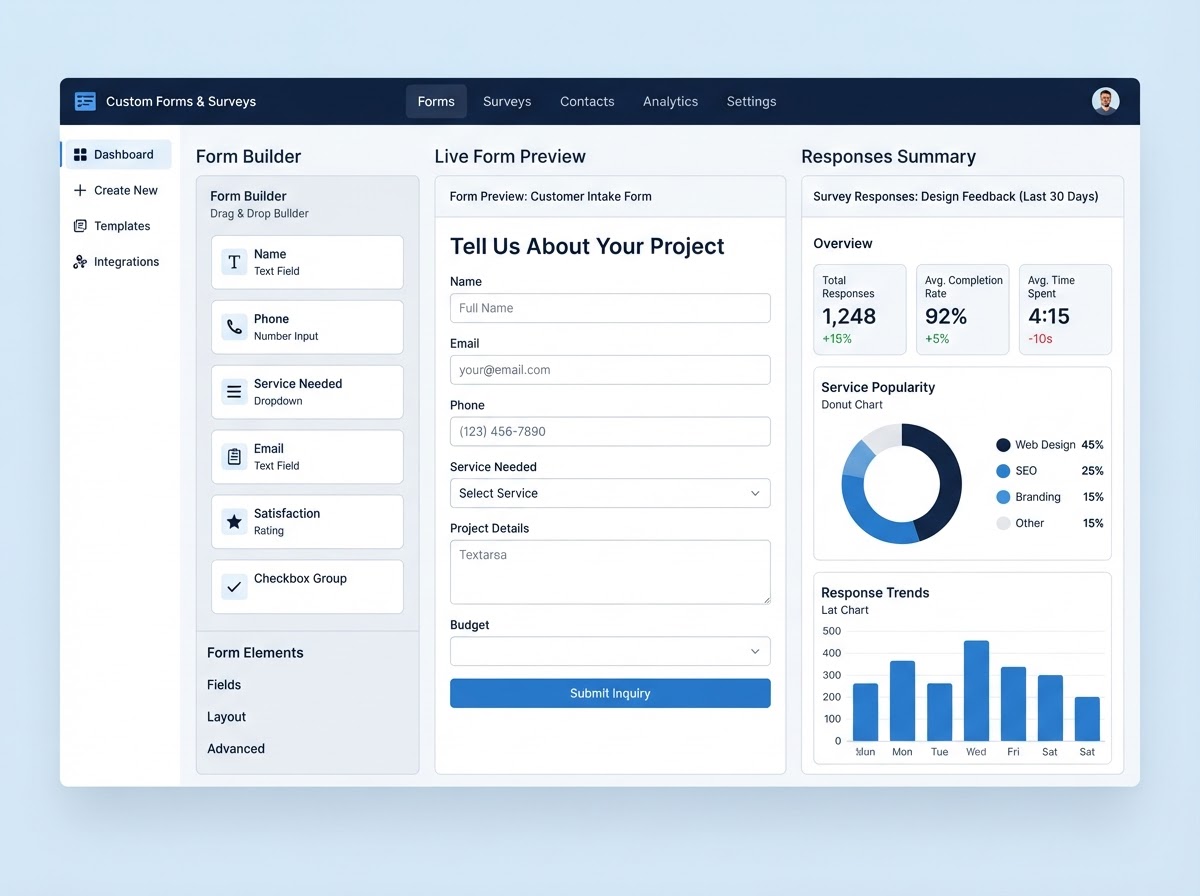
Generic contact forms capture a name and a phone number — but service businesses need more. An HVAC tech needs to know the unit type, age, and symptoms before the visit. A landscaper needs property size, current condition, and the services requested. A salon needs service preferences, allergies, and occasion. Benchmark's Custom Forms & Surveys builder lets you create exactly the form you need with a drag-and-drop builder — text fields, dropdowns, checkboxes, file uploads, conditional logic, and more — then embed it on your website, a landing page, or send it by text or email. Every response creates or updates a contact automatically, populates the right fields in your CRM, and can trigger the right follow-up workflow. Run customer satisfaction surveys after a job, pre-visit intake forms before a technician arrives, or reactivation questionnaires to past customers — and use the responses to deliver better service and recover lost revenue, all from one connected system.
How It Fits the Full Benchmark System
Every Benchmark capability connects to the next — so the customer journey never breaks. Here's where this one fits.
Get Booked
Capture & schedule every lead
Bring Them Back
Retain, review & reactivate
Start anywhere. Everything connects. See the full system →
What's Included
Drag-and-Drop Form Builder
Build any form visually — text, dropdowns, checkboxes, radio buttons, file uploads, date pickers, and more — no code required.
Conditional Logic
Show or hide fields based on previous answers, so customers only see the questions that apply to them — shorter forms, higher completion.
Pre-Visit Intake Forms
Send a form by text or email before the appointment to gather job details, unit type, symptoms, or preferences — so your team arrives prepared.
Customer Satisfaction Surveys
Send a quick post-job survey to measure satisfaction, catch unhappy customers early, and request a review from happy ones — automatically.
Embed Anywhere
Embed forms on your website, landing pages, or in emails and texts — with your branding, on your domain.
CRM-Connected Responses
Every form response creates or updates a contact and fills the right CRM fields automatically — no manual data entry, no lost information.
Workflow Triggers
Form responses can trigger follow-up workflows — an unhappy survey score routes to a manager, a completed intake form books the appointment, a reactivation response sends an offer.
Response Reporting
See completion rates, response summaries, and survey results in one view — so you understand your customers and improve your service.
The Difference It Makes
Forms & Surveys — FAQ
Can I build a form that asks for the specific information my business needs?
Yes. The drag-and-drop builder lets you add any field type — text, dropdowns, checkboxes, radio buttons, file uploads, date pickers — and use conditional logic to show or hide fields based on previous answers, so you capture exactly what you need.
Can I send a form to a customer before their appointment?
Yes. You can send a pre-visit intake form by text or email that gathers job details, unit type, symptoms, or service preferences — so your technician or stylist arrives fully prepared.
Can I run a customer satisfaction survey after a job?
Yes. Send a quick post-job survey automatically, measure satisfaction, catch unhappy customers early so you can resolve issues privately, and request a review from happy customers — all on autopilot.
Where can I use these forms?
Anywhere. Embed forms on your website or landing pages, include them in emails and texts, or share a direct link — all with your branding and on your domain.
Do form responses feed into my CRM?
Yes. Every form response creates or updates a contact and fills the right CRM fields automatically — no manual data entry. Responses can also trigger follow-up workflows, like booking an appointment or alerting a manager to an unhappy customer.
Other Benchmark System Capabilities
Website Development
An easy-to-use website that makes it simple for customers to book.
Learn MoreCRM & Sales Pipeline
A simple CRM your team will actually use — with a pipeline that closes.
Learn MoreOnline Appointment Booking
Let customers book themselves — 24/7, no phone tag.
Learn MoreAI Communications & Unified Inbox
A 24/7 AI front desk that answers every call and chat, an instant missed-call text-back, and every customer message — SMS, email, social DMs, web chat, and Google Business — in one unified inbox.
Learn MoreReviews, Reputation & Retention
More 5-star reviews, repeat customers, and reactivated past clients.
Learn MoreMarketing & Ad Management
Schedule organic posts, run paid social, and manage Google PPC — all from one dashboard.
Learn MoreEstimates & Point of Sale
Send professional estimates and collect payments in one connected system.
Learn MoreReporting & Attribution Dashboards
See exactly where every lead, call, and dollar came from — in real time.
Learn MoreAutomated Campaigns & Workflows
Branded email newsletters, bulk text blasts, ringless voicemail, and trigger-based workflow automations that run your entire customer journey — automatically, 24/7.
Learn MoreFunnels & Landing Pages
High-converting campaign landing pages and funnels built right inside your system — no separate page builder.
Learn MoreMemberships & Loyalty Programs
Recurring monthly plans and loyalty rewards that turn one-time customers into predictable revenue.
Learn MoreInvoicing & Recurring Billing
Send invoices, collect payments, and bill recurring contracts automatically — all connected to your CRM and pipeline.
Learn MoreLocal Roots. National Reach.
Benchmark is headquartered in Gilbert, Arizona, and we take exceptional pride in serving our local Phoenix metro community. That same strategy and system-building is available to service businesses and commercial companies nationwide — wherever you're ready to grow, we meet you there.
Gilbert, Phoenix, Scottsdale, Queen Creek, Mesa, Chandler, Glendale, Paradise Valley, North Scottsdale, Sedona, and Tucson, Arizona — and nationwide (remote).
Ready to Put This to Work?
Build intake forms, surveys, and questionnaires that capture exactly what you need — and feed it straight into your CRM. Let's build it into your system.